Set Up Wallets
Initialize a custody provider and create wallets for signing transactions.
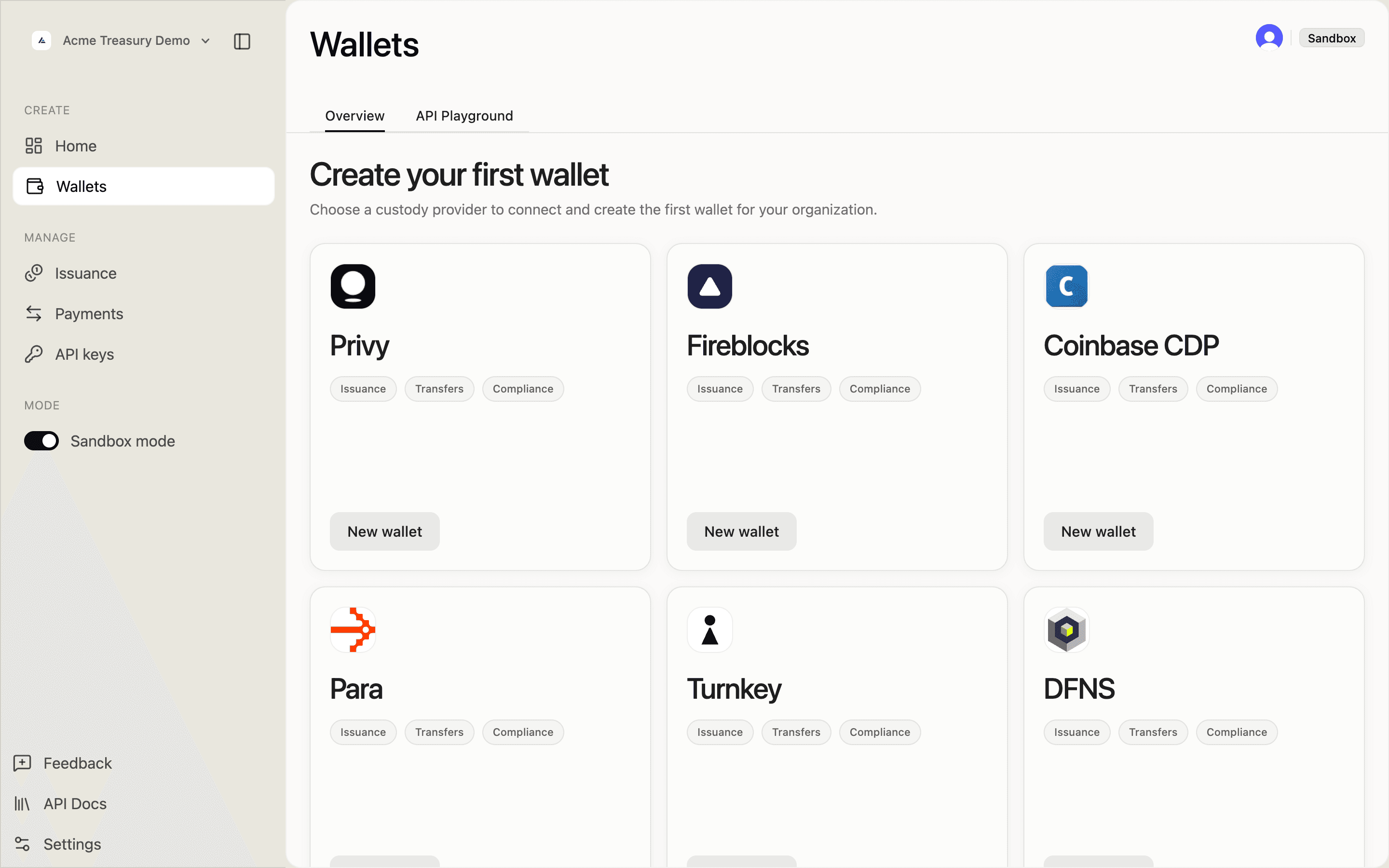
Wallets are Solana keypairs managed by a custody provider. SDP uses them to sign transactions for token deployment, minting, transfers, and other onchain operations. You must initialize a signing provider before creating tokens or executing transactions.
Supported providers
| Provider | Description | Use case |
|---|---|---|
| Privy | Managed custody (recommended) | Production and sandbox |
| Fireblocks | Institutional-grade MPC custody | Enterprise production |
| Coinbase CDP | Coinbase Developer Platform custody | Production |
| Para | MPC wallet infrastructure | Production |
| Turnkey | Non-custodial key management | Production |
| DFNS | API-driven MPC wallet orchestration | Production |
| Anchorage | Institutional custody with managed wallet lifecycle | Compliance and treasury operations |
1. Navigate to Wallets
Open the sidebar and click Wallets. If you haven't linked your organization yet, complete the organization setup first.
2. Start wallet setup
Click Get started on the wallet setup card. This opens the provider setup flow.
3. Configure your provider
Fill in the setup form:
- Provider — choose from the supported custody providers shown in the setup grid
- Wallet label — a descriptive name for the first wallet
- Fireblocks credentials — required only when the selected provider is Fireblocks
Click Connect provider & create wallet to initialize signing and provision the first wallet.
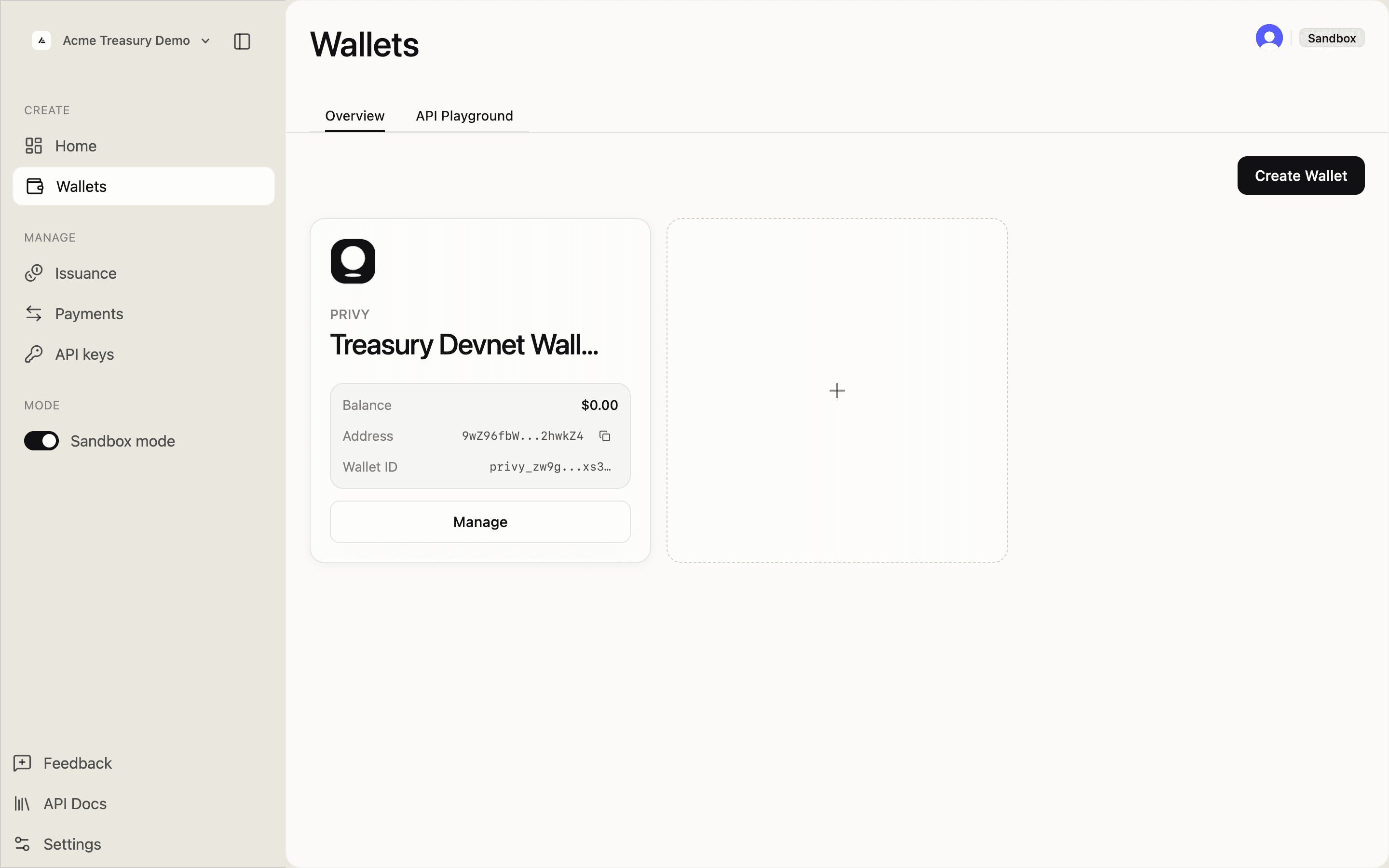
4. View your wallet
After provisioning, the Wallets page shows your active provider configuration and wallet cards:
- Provider — the active custody provider
- Address — the wallet public key
- Wallet ID — the custody wallet identifier used by SDP
- Balance — the latest cached balance for the wallet
A note at the bottom reads: "Changing providers affects new actions only. Existing onchain authorities are not automatically rotated."
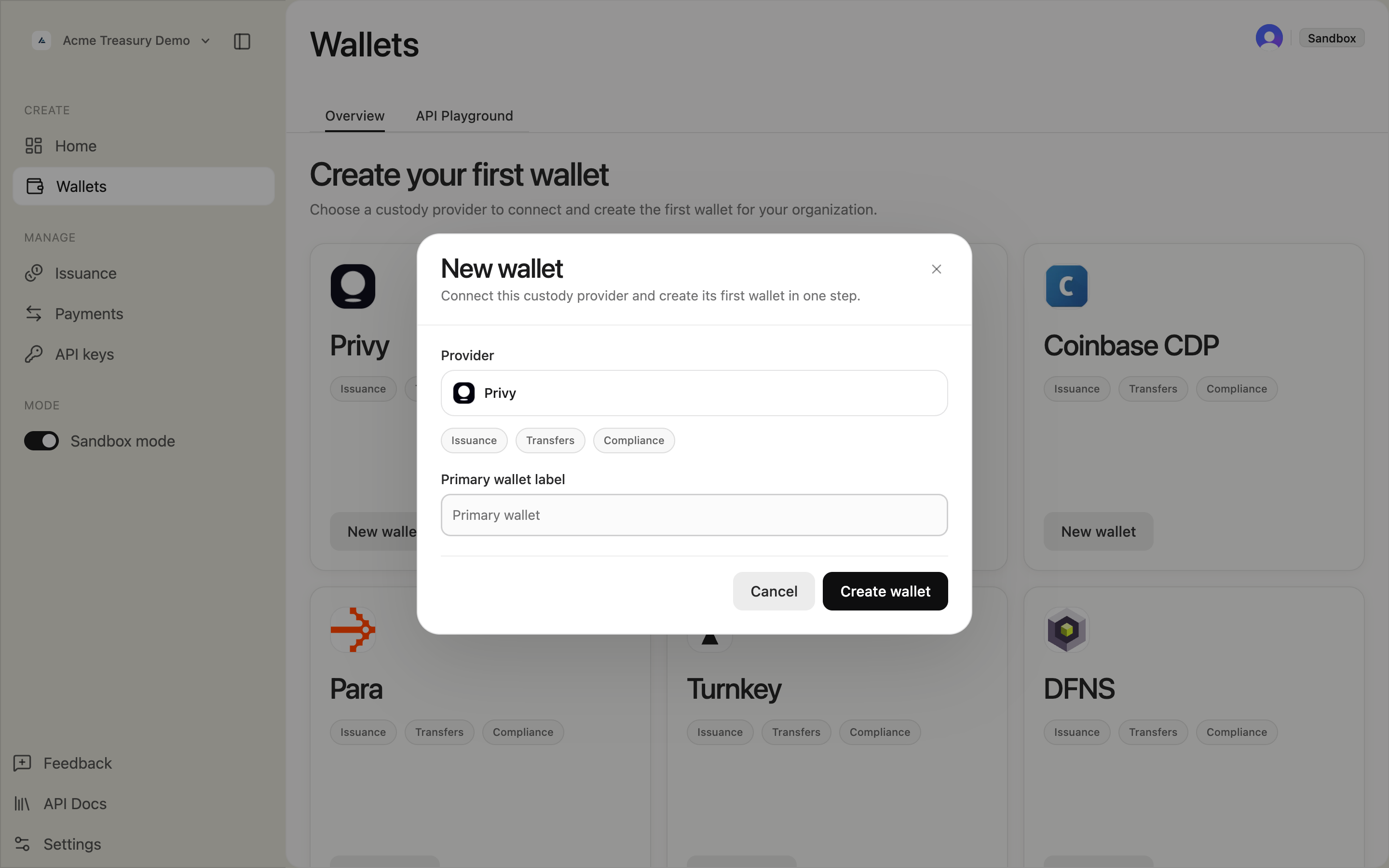
5. Create additional wallets (optional)
Click New wallet in the top right. The modal has:
- Provider — preselected when only one active provider can create wallets, otherwise selectable
- Capabilities — provider feature chips for issuance, transfers, or compliance
- Wallet label — descriptive name (placeholder: "Signing wallet")
Some providers can be connected but do not yet support provisioning additional wallets from the dashboard.
1. Initialize the signing provider
curl -X POST https://api.solana.com/v1/wallets/initialize \
-H "Authorization: Bearer sk_test_..." \
-H "Content-Type: application/json" \
-d '{
"provider": "privy",
"walletLabel": "Master wallet"
}'const response = await fetch("https://api.solana.com/v1/wallets/initialize", {
method: "POST",
headers: {
"Authorization": "Bearer sk_test_...",
"Content-Type": "application/json",
},
body: JSON.stringify({
provider: "privy",
walletLabel: "Master wallet",
}),
});
const { data } = await response.json();
// data: { configId, publicKey, walletId }HttpRequest request = HttpRequest.newBuilder()
.uri(URI.create("https://api.solana.com/v1/wallets/initialize"))
.header("Authorization", "Bearer sk_test_...")
.header("Content-Type", "application/json")
.POST(HttpRequest.BodyPublishers.ofString("""
{
"provider": "privy",
"walletLabel": "Master wallet"
}"""))
.build();2. Create additional wallets
curl -X POST https://api.solana.com/v1/wallets \
-H "Authorization: Bearer sk_test_..." \
-H "Content-Type: application/json" \
-d '{
"label": "Mint authority wallet",
"purpose": "mint_authority",
"setDefault": false
}'const response = await fetch("https://api.solana.com/v1/wallets", {
method: "POST",
headers: {
"Authorization": "Bearer sk_test_...",
"Content-Type": "application/json",
},
body: JSON.stringify({
label: "Mint authority wallet",
purpose: "mint_authority",
setDefault: false,
}),
});HttpRequest request = HttpRequest.newBuilder()
.uri(URI.create("https://api.solana.com/v1/wallets"))
.header("Authorization", "Bearer sk_test_...")
.header("Content-Type", "application/json")
.POST(HttpRequest.BodyPublishers.ofString("""
{
"label": "Mint authority wallet",
"purpose": "mint_authority",
"setDefault": false
}"""))
.build();The purpose field is optional metadata in the API. The current dashboard create-wallet flow does not expose wallet-purpose selection.
3. Check signing configuration
curl https://api.solana.com/v1/wallets/config \
-H "Authorization: Bearer sk_test_..."const response = await fetch("https://api.solana.com/v1/wallets/config", {
headers: { "Authorization": "Bearer sk_test_..." },
});
const { data } = await response.json();HttpRequest request = HttpRequest.newBuilder()
.uri(URI.create("https://api.solana.com/v1/wallets/config"))
.header("Authorization", "Bearer sk_test_...")
.GET()
.build();4. Set a default wallet
curl -X POST https://api.solana.com/v1/wallets/default-wallet \
-H "Authorization: Bearer sk_test_..." \
-H "Content-Type: application/json" \
-d '{ "walletId": "wal_xyz789" }'await fetch("https://api.solana.com/v1/wallets/default-wallet", {
method: "POST",
headers: {
"Authorization": "Bearer sk_test_...",
"Content-Type": "application/json",
},
body: JSON.stringify({ walletId: "wal_xyz789" }),
});HttpRequest request = HttpRequest.newBuilder()
.uri(URI.create("https://api.solana.com/v1/wallets/default-wallet"))
.header("Authorization", "Bearer sk_test_...")
.header("Content-Type", "application/json")
.POST(HttpRequest.BodyPublishers.ofString("""
{ "walletId": "wal_xyz789" }"""))
.build();